As an Amazon Associate I earn from qualifying purchases. Some links on this page are affiliate links — if you buy through them, we may earn a commission at no extra cost to you.Disclosure
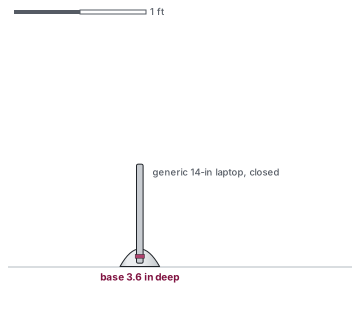
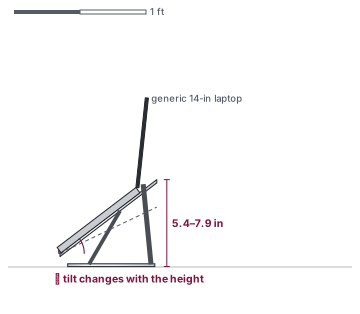
Short answer: vertical if the laptop's screen stays shut and an external monitor does the work — it saves desk space. Horizontal if you look at the laptop's screen — it lifts that screen toward eye level. The deciding fit figure differs: closed thickness for vertical, lift range and size range for horizontal. They are not two heights of the same product. One holds a closed laptop on its edge; the other holds an open laptop on a platform or hook.
Side by side
Vertical dock vs horizontal stand
Vertical
Horizontal
Laptop lid
closed
open
Needs a monitor
yes — the laptop's screen is not in use
no, though you can still add one
Key fit figure
slot width (closed thickness)
lift and size range
Here
BookArc Flex (up to 16 in, ≤ 1 in thick, 8.43 × 3.6 in); OMOTON (slot 0.55–2.71 in, 5.9 × 3.7 in)
mStand (5.9 in, 10 × 7.5 in), iLevel2 (5.4–7.9 in, 10.1 × 8.8 in), BESIGN LS03 (5.7 in, retailer listing), Roost V3 (6.5–12.5 in screen lift)
Typing on the laptop
not in the stand — the lid is closed
only on a low stand or pad; a high stand needs a separate keyboard
Load rating published
neither BookArc Flex nor OMOTON publishes one
some do (BESIGN 8.8 lb, VIVO tray 22 lb, MOFT Large 11 lb); Rain Design and Roost do not
Spec
Twelve South BookArc Flex
OMOTON Vertical Laptop Stand
Rain Design iLevel2
Rain Design mStand
Type
vertical
vertical
adjustable riser
fixed riser
Lift / height
not published
not published
5.4–7.9 in (stand height (maker))
5.9 in (stand height (maker))
Slot / sizes
up to 1 in thick, up to 16 in
0.55–2.71 in thick
all notebooks (maker FAQ)
all MacBooks; most notebooks; 16-in MacBook Pro sits securely (maker FAQ)
Footprint
8.43 x 3.6 in
5.9 x 3.7 in
10.1 x 8.8 in
10 x 7.5 in
Stand weight
0.53 lb
1.32 lb
3.5 lb
3 lb
Which question you are actually answering
Vertical and horizontal are two of the types compared in stand vs riser vs arm, alongside a clamp-on tray arm and a cooling pad. Those other types don't replace this choice: an arm still holds an open laptop, and a pad still tilts an open laptop.
If the question is "how do I get this laptop's screen up to eye level?", a vertical stand cannot answer it. It does not open the lid and it does not publish a lift. You want a horizontal stand, a riser, or a tray arm, and you want the inches from the height chart or the calculator. For a 5′8″ adult at a 29 in desk with a 14 in laptop, that seated estimate is about 4.8 in — more than the fixed risers we list. A separate keyboard goes with that lift.
If the question is "where does the closed laptop go while I work on a monitor?", a horizontal stand is the wrong tool. It takes a 10 × 7.5 in or larger patch of desk to hold an open computer you are not looking at. A vertical dock takes 8.43 × 3.6 in or 5.9 × 3.7 in and leaves the desk for the keyboard, the mouse, and the monitor. The trade-off is the slot: BookArc Flex stops at 1 in thick and 16 in; OMOTON's slot is wider (0.55–2.71 in) but the maker does not publish a screen-size limit. Measure the closed thickness, not the diagonal, before you pick. The compatibility checker handles both slot widths and size ranges.
Some desks use both: a horizontal stand when you take the laptop to a meeting or work on its screen, and a vertical dock when you come back to the monitor. They are complementary, not competitors, in that setup. If you are still choosing whether to add a monitor at all, that choice is weighed in laptop stand vs external monitor. Vertical picks are collected on the vertical stands page; open stands by range on the adjustable stands page.