As an Amazon Associate I earn from qualifying purchases. Some links on this page are affiliate links — if you buy through them, we may earn a commission at no extra cost to you.Disclosure
Short answer: set the desk to standing elbow height for typing (OSHA: elbows about level with the keyboard), then use the stand to bring the screen up. That gap is large: by our height chart, most adults need roughly 9.1–13.9 in of lift for a 14 in laptop when standing. The Roost V3 (up to 12.5 in screen lift) and the VIVO tray arm cover the most; the iLevel2 tops out at 7.9 in.
Your height
Standing desk at elbow (+1 in shoes)
Standing eye height
Lift for a 14 in laptop
5′0″
38.8 in
57.2 in
9.1 in
5′4″
41.3 in
60.9 in
10.3 in
5′8″
43.8 in
64.6 in
11.5 in
6′0″
46.4 in
68.4 in
12.7 in
6′4″
48.9 in
72.1 in
13.9 in
Estimates: standing elbow 0.63 × height and standing eye 0.936 × height (Drillis & Contini, via Winter), screen top 1 in below the eye. Your own measurements in the height calculator beat these.
Spec
Roost V3
VIVO STAND-V001L Laptop Tray Desk Mount
Rain Design iLevel2
Lift / height
6.5–12.5 in (screen lift (maker))
height set along a 17 in pole (maker)
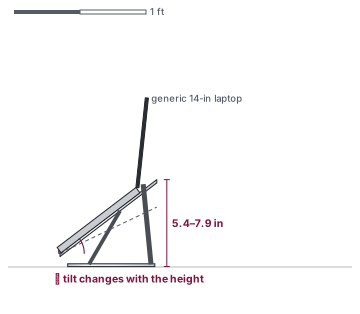
5.4–7.9 in (stand height (maker))
Max load
not published
22 lb
not published
Supported laptops
all makes and models (maker)
laptops up to 17 in
all notebooks (maker FAQ)
Mount
sits on the desk
C-clamp (desk 0.4–3.4 in) or grommet (0.4–3 in); 16.5 in arm extension; VESA 75/100 if tray removed
sits on the desk
Tier
Mid-range
Budget
Mid-range
If you switch between sitting and standing, you need the stand to move too — or keep it at the standing height and lower only the desk; the seated numbers are in the height chart. Lift ranges side by side are on the adjustable stands page, and screen distance and angle in laptop stand ergonomics. With a laptop this high, a separate keyboard is not optional — see why.
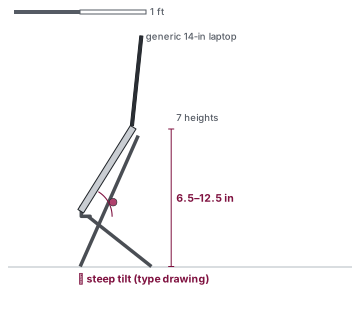
Illustration, not to scale · See photos on Amazon Lift height drawn to scale; the open stand's depth isn't published, so the legs are a type drawing.
Lift 6.5–12.5 in
Load not published
all makes and models (maker)
Good fit for: the lightest stand here at 6 oz; the highest published lift (12.5 in).
Variant
Standard (7 heights)
Lift / height
6.5–12.5 in (screen lift (maker)); 7 settings
Angles
not published
Max load
not published
Supported laptops
all makes and models (maker)
Platform / footprint
not published
Lip height
not published
Stand weight
0.38 lb
Folded size
1 x 1.5 x 13 in
Material
not published
Ventilation / fans
not published
Warranty
not published
Limits: load rating not published on the US maker page; its lift puts the screen above typing height, so it needs a separate keyboard and mouse.
The Roost homepage gives 6–11 in; the V3 product page (6.5–12.5 in) is used. Load rating and front-edge limit are not on the US maker page (only on an Australian distributor page), so they show as not published.
Skip it if… you need a published load rating for a heavy laptop; you won't use an external keyboard.
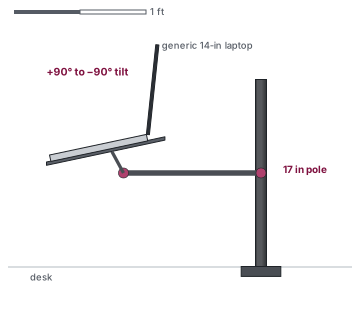
Illustration, not to scale · See photos on Amazon Type drawing of the arm; pole and arm lengths are the maker's, but the desk and laptop are placeholders.
Lift not published
Max load 22 lb
laptops up to 17 in
Good fit for: a laptop beside a monitor on a clamp-on arm; 17 in laptops up to 22 lb.
Variant
Black
Lift / height
height set along a 17 in pole (maker)
Angles
+90° to −90° tilt, 180° swivel, 360° rotation
Max load
22 lb
Supported laptops
laptops up to 17 in
Platform / footprint
14 x 11.8 in tray
Lip height
not published
Stand weight
not published
Folded size
not published
Material
steel, aluminum
Ventilation / fans
not published
Mount
C-clamp (desk 0.4–3.4 in) or grommet (0.4–3 in); 16.5 in arm extension; VESA 75/100 if tray removed
Warranty
3 years
Limits: needs a desk edge 0.4–3.4 in thick for the clamp; lift is set along a 17 in pole; maker gives no lift figure.
Skip it if… you can't clamp to your desk; you need to move it between rooms.